NEFF logo

How to Register Your Appliance

Please enter the model number (E-Nr.) to get started.

Then add the purchase date of your appliance in the next field.

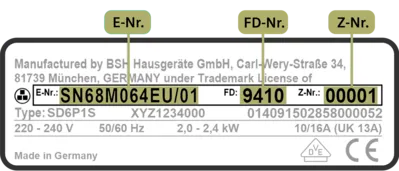
You can find your appliance details (E-number, FD number, and serial number) on the appliance type plate. Below, you can see an example of a type plate and where it is usually located on your appliance.

Example of an Appliance Typeplate:

Label displaying model information with serial numbers for a Neff appliance, including E.Nr, FD and Z.Nr specifications.

If you need help finding your appliance data click the link below:

Appliance Information

Scan/upload your appliance typeplate or enter the data manually below.

Up to 1 image • JPG, JPEG or PNG • Up to 5MB

or

MyNEFF
Register your product and sign up for a MyNEFF account to receive great offers and useful online tips.
Register now
Our Service
Got a query? Need some parts or an engineer? Give us a call. We’re always here to help.
Find out more
Discover NEFF
Find kitchen stories, recipes, events, cookery schools and lots more cooking inspiration here.
Discover More
Find your Dealer
Find the nearest NEFF dealer to help you create your dream kitchen.
Get in touch